
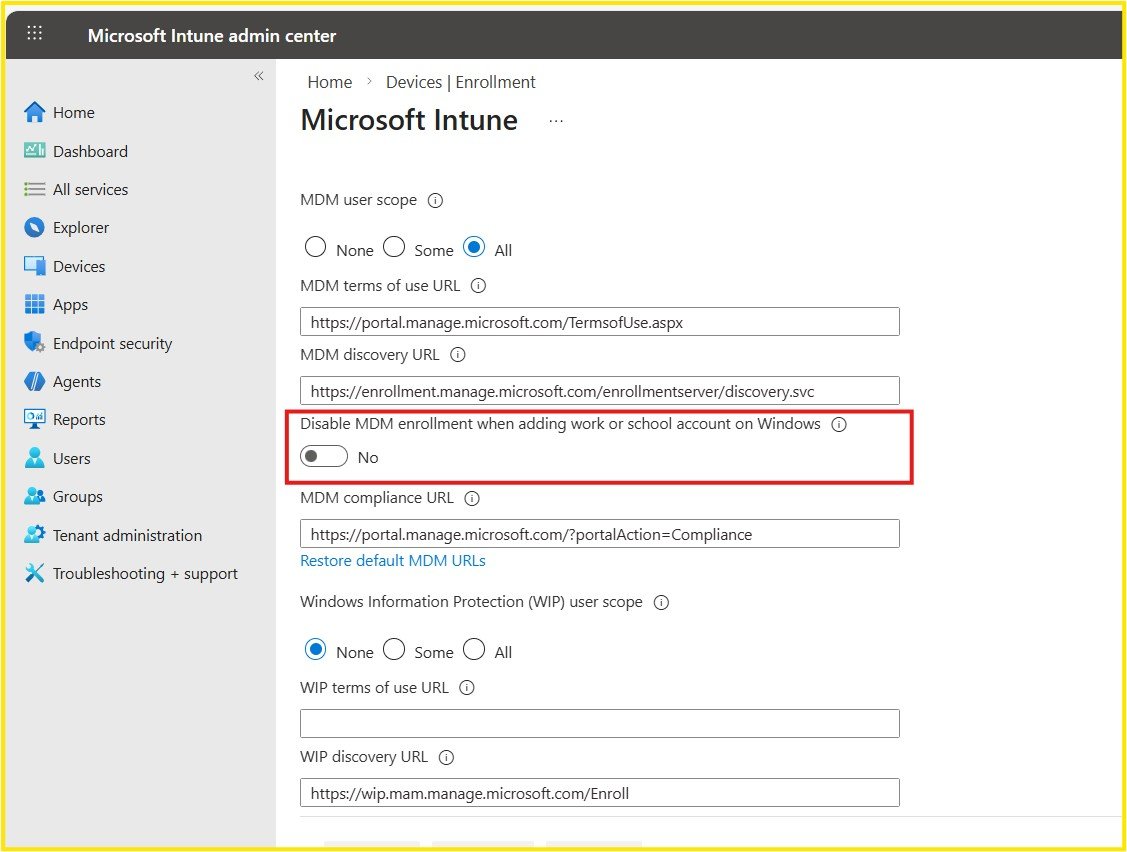
For years, Windows BYOD environments had a hidden friction point.
When users signed into Teams, Outlook, or Edge on personal devices, they were prompted with:
“Allow my organization to manage my device”
Most users clicked “Next” without fully understanding the implications.
The result?
Their personal device became fully enrolled into Microsoft Intune (MDM).
Why This Was a Problem
This behavior caused:
- Unintentional corporate device enrollment
- Automatic application of compliance policies
- Security baselines on personal devices
- User frustration and trust issues
- IT overhead to clean up accidental enrollments
The root issue was simple:
Identity registration and device management were tightly coupled.
The New Intune Setting (Public Preview)
Microsoft has introduced a new configuration option:
Disable MDM enrollment when adding a work or school account on Windows
When this setting is enabled:
- Devices can register in Microsoft Entra ID
- Users gain access to corporate applications
- No automatic Intune enrollment occurs
- Personal devices remain personal
This creates a clear boundary between:
Identity Access → Allowed
Device Management → Controlled intentionally
What This Setting Does NOT Impact
It’s important to clarify what this feature does not affect:
- Windows Autopilot deployments
- Company Portal–based enrollments
- Fully managed corporate devices
- Intentional MDM onboarding workflows
This setting specifically targets accidental enrollment scenarios during sign-in.
Why This Matters for BYOD Governance
In modern hybrid workplaces:
- Users expect flexibility
- Organizations require control
- IT teams need clarity
This setting enables all three.
It reduces operational cleanup, improves user trust, and strengthens endpoint governance without compromising identity security.
Final Thoughts
For years, IT administrators had to explain why personal devices were suddenly managed.
Now, with one configuration change, that friction can be eliminated.
It’s a small adjustment — but a meaningful improvement for BYOD environments.
Fixr.Cloud – Smarter IT, Simplified.






